
Descript Pricing 2026: Plans, Costs and AI Credit Limits

By :
Jaclyn Donaldson
August 12, 2026
Descript makes the most sense for SaaS teams that want editing, transcription, repurposing, recording, and AI-assisted production inside one workspace.
For content marketers, product marketers, and lean SaaS teams, its value comes from cutting the number of separate tools needed for weekly video production.
Descript pricing starts at $0, while paid plans start at $16 per person per month with annual billing.
The plan I would put most SaaS marketing teams on is Creator. It gives you far more production room without pushing you into team-level Business pricing.
Key Takeaways From Descript Pricing
Descript Pricing Plans and Monthly Costs
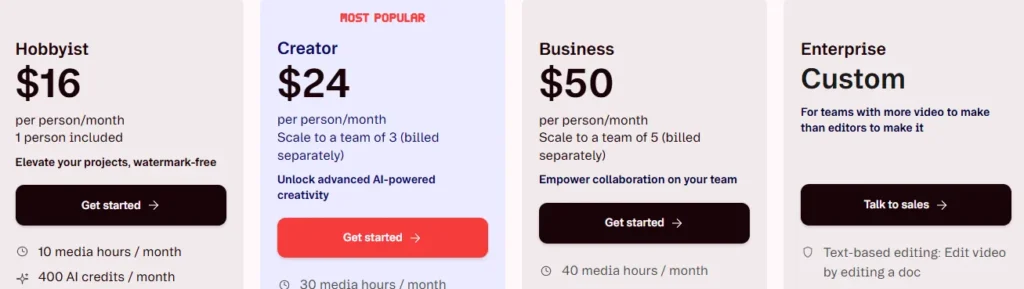
Here is the clean pricing view before we get into who should actually pay for each tier.
| Plan | Annual Billing | Monthly Billing | Best Fit |
|---|---|---|---|
| Free | $0 | $0 | Testing the editor and occasional light projects |
| Hobbyist | $16/person/month | $24/person/month | Solo marketers with modest monthly output |
| Creator | $24/person/month | $35/person/month | Active SaaS content teams and serious creators |
| Business | $50/person/month | $65/person/month | Marketing departments needing brand and team controls |
| Enterprise | Custom | Custom | Larger organisations with security and procurement requirements |
Annual billing can save up to 35% compared with paying month by month. The actual saving differs by tier.
Descript Free Plan for Testing Real Workflows
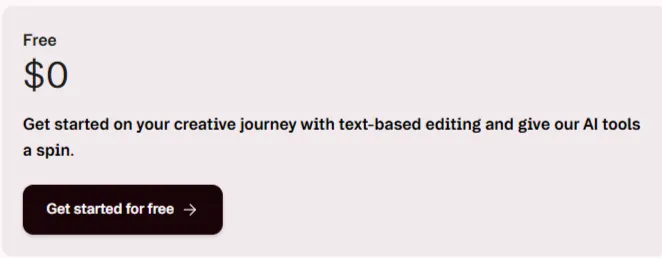
The Descript free plan is useful for checking how text editing, captions, recording, transcription, and AI tools fit your production process.
You get 60 media minutes each month, plus 100 AI credits as a one-time allowance. Local and web-link video exports are capped at 720p.
For a SaaS marketer, I would use Free to edit one short product clip, test a transcript, and run a few AI edits.
That gives you enough evidence to judge the workflow without paying first. It is not the tier I would use for client-facing production.
Hobbyist Plan for Solo SaaS Marketers
Hobbyist is the first tier that feels practical for regular publishing. It includes 10 media hours and 400 AI credits each month.
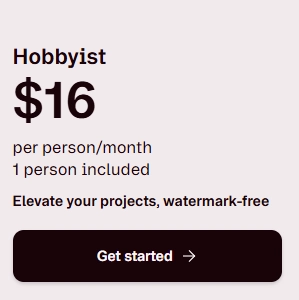
You also move to watermark-free 1080p exports, which matters for product demos, founder clips, LinkedIn video, customer interviews, and YouTube content.
The issue is volume. Ten media hours can disappear quickly when you import webinar recordings, podcast episodes, sales calls, or longer customer interviews.
If repurposing long recordings is part of your weekly process, Creator is easier to justify.
Creator Plan for SaaS Content Production
Creator is where Descript pricing for marketers becomes much easier to defend as a recurring software cost.
You get 30 media hours monthly, 800 AI credits, watermark-free 4K video export, and broader access to Underlord and more than 20 AI tools.
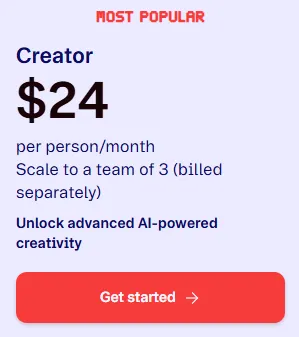
It also adds royalty-free stock media access, AI video generation, and the option to purchase extra media hours or AI credits during production spikes.
This is the tier I would pick for a content marketer turning one webinar into clips, a cleaned recording, captions, a transcript, and social assets.
Creator can support up to three team members, billed separately, so its cost needs to be calculated per editor rather than per workspace.
Business Plan for Brand-Led Marketing Teams
The Descript Business plan is less about basic editing and more about keeping larger marketing output controlled across several people.
It provides 40 media hours and 1,500 AI credits per person each month, plus team-wide Brand Studio access.
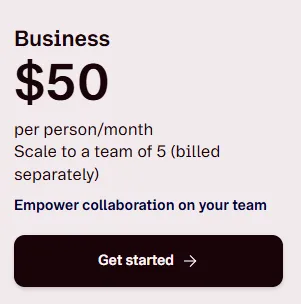
Business also includes translation and dubbing in 30+ languages with proofreading, custom avatar generation, priority support with an SLA, and top-up access.
For a three-person team, the cost becomes meaningful, so I would not upgrade purely for extra media hours.
The Business case gets stronger once multilingual campaigns, shared brand assets, avatars, or support response commitments have direct operational value.
Enterprise Pricing for Security and Procurement Needs
Descript Enterprise pricing is custom, so there is no public per-seat amount to plug into a fixed budget.

Enterprise adds team-sized media and AI allowances, company-level Brand Studio controls, custom data retention, and the ability to opt out of AI training.
Security features include SOC 2 Type II support, SSO, SCIM, and audit logs. Procurement can also get custom legal terms and flexible billing.
This tier is built for companies where security review, vendor approval, data policy, onboarding, and account management matter as much as editing features.
How Descript Media Minutes Affect Your Bill
Descript media minutes are consumed when media is uploaded or recorded inside Descript, even when transcription is not the main reason for importing it.
That makes media volume more important than finished-video length. A one-hour webinar can use far more allowance than several short social exports.
Current monthly allowances are 60 minutes on Free, 600 on Hobbyist, 1,800 on Creator, and 2,400 on Business.
Unused monthly media minutes do not carry into the next billing period, so buying far above your normal production volume can waste capacity.
How Descript AI Credits Change Plan Value
Descript AI credits pay for AI-assisted actions such as Underlord, Studio Sound, filler-word removal, Green Screen, Eye Contact, AI speech, avatars, and generated media.
Even chatting with Underlord can consume a few credits. That matters if your team treats the AI assistant as part of the normal editing process.
Free includes 100 one-time credits. Hobbyist includes 400 monthly, Creator 800 monthly, and Business 1,500 monthly.
Recurring unused AI credits expire at the end of the monthly cycle. For AI-heavy workflows, your real cost is tied to usage frequency, not project count.
Descript Top-Up Pricing for Production Spikes
Creator and Business users can purchase extra capacity without moving to a higher subscription tier.
| Top-Up | Price |
|---|---|
| 350 AI credits | $35 |
| 1,000 AI credits | $80 |
| 3,000 AI credits | $180 |
| 8,000 AI credits | $400 |
| 5 media hours | $25 |
| 20 media hours | $80 |
| 50 media hours | $150 |
Top-ups are shared across the Drive, are used after the recurring allowance runs out, and expire 12 months after purchase.
For an occasional webinar launch or campaign sprint, that is cheaper than keeping a higher subscription year-round just for temporary peaks.
Descript Annual Pricing Versus Monthly Billing
Descript annual pricing is clearly better for teams that already know the software will stay in their content stack.
| Plan | 12 Months Paid Monthly | 12 Months on Annual Rate | Yearly Saving |
|---|---|---|---|
| Hobbyist | $288/person | $192/person | $96/person |
| Creator | $420/person | $288/person | $132/person |
| Business | $780/person | $600/person | $180/person |
Monthly billing still has a place. It is useful for a short campaign, a temporary production cycle, or a team still validating its editing process.
Once Descript becomes part of weekly content operations, annual billing is the cleaner cost decision.
Descript Team Pricing for Three to Five Editors
Per-person billing matters once Descript moves from a solo tool into a shared SaaS content workflow.
A three-editor Creator setup costs $72 per month on the annual rate, equal to $864 per year. Paying monthly pushes that same team to $105 per month.
For Business, three editors cost $150 per month on the annual rate. A five-editor setup reaches $250 per month, or $3,000 across a full year.
On monthly Business billing, five editors cost $325 per month. That is why seat count should be part of the purchase decision before a marketing lead upgrades the workspace.
Our rule is simple: buy Business for Business-only capabilities, not merely because another editor joins the team.
Which Descript Plan Fits Each SaaS Team?
| SaaS Use Case | Our Pick | Reason |
|---|---|---|
| Testing text-based editing | Free | No subscription needed for initial workflow testing |
| Solo content marketer | Hobbyist | Enough for controlled monthly video output |
| Weekly SaaS content engine | Creator | Strong mix of media hours, AI credits, 4K exports, and stock media |
| Multi-market marketing team | Business | Brand Studio, localisation, avatars, larger usage, and priority support |
| Security-led organisation | Enterprise | SSO, SCIM, audit logs, data controls, procurement support |
Descript Pricing Compared With Top AI Video Editors
Price alone does not tell you which AI video editing software fits a SaaS team. The production model matters just as much.
| Platform | Paid Entry Price | Strongest Pricing Fit |
|---|---|---|
| Descript | $16/person/month annually | Text-led editing, transcription, repurposing, podcasts, and SaaS content production |
| Riverside | $24/month annually for Pro | Remote recording, interviews, podcasts, and studio-quality capture |
| VEED | From about $12/user/month | Browser-based video editing, social content, subtitles, and AI creation |
| Kapwing | $16/member/month annually for Pro | Fast browser editing, social formats, team collaboration, and 4K exports |
Riverside is more recording-first. VEED and Kapwing lean harder into browser-based visual editing and social production.
Descript stands out when your workflow begins with spoken content and ends with edited video, transcripts, clips, captions, and reusable marketing assets.
StackedReview Recommendation for SaaS Marketers
For most SaaS marketing teams, we would start with Creator rather than Business.

The 30 monthly media hours give you enough room for regular webinars, product walkthroughs, interviews, podcasts, and repurposed social content.
The 800 AI credits also give the editing team more space to use Underlord and AI cleanup without rationing every action.
Move to Business when brand governance, localisation, custom avatars, support SLAs, or higher team usage are recurring needs rather than occasional extras.
Hobbyist still makes sense for solo marketers, but its 10-hour allowance can feel restrictive once long-form recordings become part of the calendar.
FAQs About Descript Pricing Plans
Do Descript AI credits roll over monthly?
No. Unused monthly AI credits expire at the end of each billing cycle, so teams should schedule heavier AI production around their recurring credit allowance.
How do Descript media minutes get counted?
Media minutes are used when you upload or record audio and video. Still images consume one second each, and unused monthly minutes do not roll over.
Can Creator and Business plans buy top-ups?
Yes. Creator and Business accounts can buy extra AI credits or media minutes. Purchased top-ups are shared across the Drive and expire after twelve months.
Does Descript charge each team editor separately?
Yes. Paid pricing is per person, and added editor seats are billed separately. Mid-cycle seat additions are prorated for the remaining subscription period automatically by Descript.
What happens after cancelling a Descript subscription?
Your paid plan remains active until the current billing period ends. Then the Drive moves to Free, while existing projects stay accessible for future editing.
Does upgrading Descript reset current usage limits?
No. An upgrade applies immediately and increases your plan limits, but usage already consumed during that billing cycle still counts against the new total allowance.
Is Descript Pricing Worth It for SaaS Teams?
Descript is easiest to justify when one subscription replaces several steps in the content process rather than acting as another standalone editor.
A SaaS team can record a webinar, clean the audio, edit from the transcript, cut clips, add captions, and prepare reuse assets without switching workflows repeatedly.
That is where the subscription earns its place. The right plan is the one that matches monthly source-media volume and AI usage, not the number of exports.
For recurring marketing production, Creator is our value pick. Business is better reserved for teams that can put its brand, localisation, and admin features to work.

Affiliate Disclosure: This post may contain some affiliate links, which means we may receive a commission if you purchase something that we recommend at no additional cost for you (none whatsoever!)
Similar Posts






Verification process
Editorial standards
We’re a team of real users — not bots, not press-release copiers. Here’s exactly how we earn your trust on every single post.
We Actually Buy the Products
Every deal on this site is tested with a real purchase using our own accounts. We don’t rely on screenshots sent by vendors or press kits. If we say the discount works, we’ve clicked through checkout ourselves.
No Pay-to-Rank Policy
We never accept payment to feature or rank a deal higher. Affiliate commissions don’t influence our editorial scores — a bad deal stays ranked low regardless of commission size.
Monthly Re-Verification
Pricing changes fast. Our team re-tests every published deal at least once a month and immediately updates or removes any that have expired, changed, or been capped.
Expert Editorial Team
Our writers and editors have collectively spent 40,000+ hours hands-on with digital tools. We know what a fair price looks like — and we call out bad deals even when they’d earn us commissions.
Transparent Scoring Criteria
Every score is calculated from a public rubric: discount value, feature-to-price ratio, redemption ease, plan flexibility, and competitor comparison. No hidden weighting, ever.
Reader Feedback Loop
Thousands of readers report broken deals each month. Our team investigates every report within 24 hours and updates the page the same day a deal stops working.
Jaclyn Donaldson
Jaclyn is a content strategist at StackedReview with a passion for empowering small businesses. She specializes in dissecting social media advertising costs and hunting down the best-value deals. Her goal is to help brands stretch their budget further without compromising on results.