OpenArt Pricing 2026: Plans, Credits and Full Cost Breakdown

By :
Lewis Gil
August 7, 2026
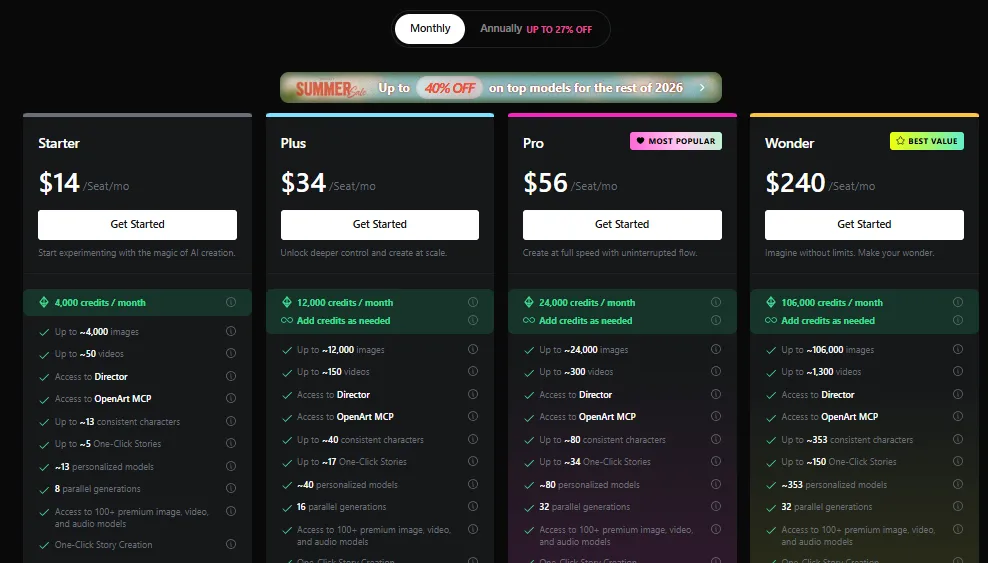
OpenArt pricing starts at $14 per month for Starter, giving SaaS marketers a practical entry into image, video, audio, character, story, and editing workflows from one account.
For ongoing campaign work, Plus offers stronger value because it adds commercial usage rights, more monthly credits, extra credit access, and enough capacity for regular creative testing.
OpenArt Pricing Facts You Need to Know
How Much Does OpenArt Cost?
| Plan | Monthly Price | Annual Rate | Monthly Credits | Best SaaS Use |
|---|---|---|---|---|
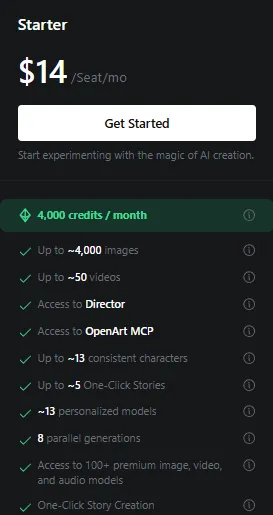
| Starter | $14 | $13 per month | 4,000 | Light campaign visuals and testing |
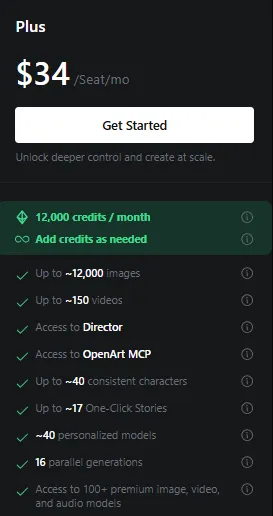
| Plus | $34 | $27 per month | 12,000 | Recurring SaaS content production |
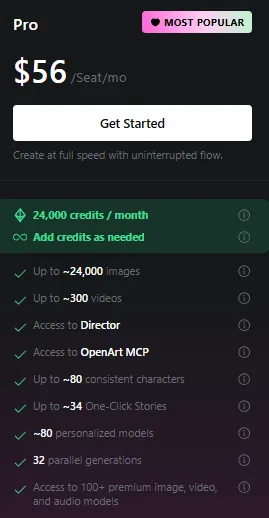
| Pro | $56 | $44 per month | 24,000 | High volume creative testing |
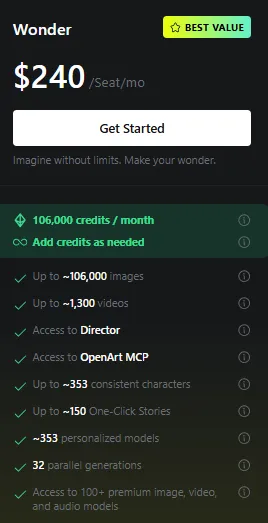
| Wonder | $240 | $175 per month | 106,000 | Agency and studio scale output |
Annual rates are billed for a full year. Monthly billing costs more, yet it keeps commitment low for teams still measuring campaign usage.
|
Exclusive OpenArt Coupon Choose the Right OpenArt Plan and Save 15% with an Exclusive Coupon Apply coupon code ALL15 at checkout to save 15% on an eligible OpenArt plan. It is a practical way for creators, marketers, and agencies to reduce the cost of everything from occasional campaign visuals to high-volume creative production. Claim 15% Off → |
Paste at checkout |
How OpenArt Credits Fit SaaS Marketing Work
Credits fund generation across available models, so actual output depends on model choice, resolution, duration, settings, and the number of revisions needed.
OpenArt lists estimated maximums for images and videos. SaaS marketers should treat those figures as capacity guides, not guaranteed production totals.
Budget around approved assets, not raw generations. Landing page visuals and video tests often need several attempts before framing, style, copy space, and brand details feel usable.
OpenArt Starter Plan: Best for Light SaaS Creative Testing
Starter suits light creative testing where a marketer needs broad model access without committing a larger budget or building a daily production process.
This tier works for marketers testing AI image generation software on blog graphics, social posts, webinar covers, lead magnet visuals, and early campaign concepts.
The main limitation is commercial usage. Starter does not list commercial use rights, so paid ads and revenue focused campaign assets are better placed on Plus.
Best use: Choose Starter for internal drafts, low frequency content, or a short evaluation before placing OpenArt inside a recurring SaaS workflow.
Plus Plan: Best Value for SaaS Marketers
OpenArt Plus shifts OpenArt from an evaluation tool into a practical campaign system for teams publishing creative assets every week.
More importantly, Plus adds commercial use rights and access to extra credit purchases, making it a safer operational choice for published marketing campaigns.
For a SaaS company publishing weekly content, testing paid social creatives, and refreshing product page visuals, Plus balances cost, capacity, and usage rights well.
Our pick: Plus is the plan we would select for a small SaaS marketing team with steady output but no need for agency level volume.
OpenArt Pro Plan: Built for Frequent Campaign Iteration
Pro targets frequent campaign iteration, with more production headroom and 32 parallel jobs for teams handling several creative requests at once.
Pro makes sense for product launches, quarterly campaign pushes, active paid media programs, and content teams that regularly exhaust a lower credit pool.
Upgrade trigger: Pick Pro when creative speed affects campaign delivery and several marketers or designers depend on the same monthly production capacity.
Wonder Plan: Agency Capacity Without Per Asset Billing
OpenArt Wonder brings agency scale capacity, selected unlimited creation access, and enough monthly room for teams serving multiple products, regions, or client accounts.
It targets agencies, content studios, and large SaaS teams handling multiple products, markets, campaigns, or client accounts with constant creative demand.
Agency check: Use Wonder for a documented production pipeline, not occasional experimentation. Agencies should compare expected credit spend before upgrading.
OpenArt Coupon Code ALL15 Saves 15%
Use coupon code ALL15 to claim 15% off an eligible OpenArt monthly subscription. Apply it during checkout before payment confirmation.
| Plan | Regular Monthly Price | Price With ALL15 | Monthly Saving |
|---|---|---|---|
| Starter | $14.00 | $11.90 | $2.10 |
| Plus | $34.00 | $28.90 | $5.10 |
| Pro | $56.00 | $47.60 | $8.40 |
| Wonder | $240.00 | $204.00 | $36.00 |
The coupon is most useful when testing Plus or Pro on monthly billing before moving to an annual commitment.
Annual rates already include plan discounts, so compare final checkout totals rather than assuming a coupon can be combined with yearly savings.
|
OpenArt Coupon Save 15% on PenArt and Start Creating High-Quality Visuals for Less Use the verified coupon code ALL15 to activate an instant 15% discount on your PenArt subscription. Whether you’re an individual creator, marketer, or agency, this offer makes it more affordable to access premium AI design tools. Claim 15% Off → |
Paste at checkout |
Extra Credits, Add-Ons, and Rollover Rules
Plus, Pro, and Wonder can purchase a 5,000 credit add-on for $15 per month. Extra packs help absorb short campaign spikes without changing the base plan.
Unused add-on credits roll into the next month. Base subscription credits reset on the billing cycle, so add-on balances deserve separate tracking.
For SaaS budgeting, assign a credit owner, record campaign consumption, and review usage weekly. Untracked generation can make a low priced plan unexpectedly expensive.
Monthly Versus Annual OpenArt Billing
OpenArt annual pricing reduces effective monthly costs by 10% to 27%, with larger percentage savings on the higher tiers.
Annual billing suits teams with stable production volume, approved procurement, and a proven need for recurring image or video generation.
Monthly billing is better during evaluation, seasonal campaigns, rebranding work, or uncertain adoption. It also lets teams apply coupon code ALL15 where eligible.
Our rule is simple: run one or two full campaign cycles monthly, measure credits per approved asset, then decide if annual savings justify commitment.
Best OpenArt Plan by SaaS Marketing Workflow
| Marketing Workflow | Recommended Plan | Reason |
|---|---|---|
| Blog and social graphics | Starter | Low cost testing with broad model access |
| Paid ads and landing pages | Plus | Commercial rights and practical monthly capacity |
| Weekly multichannel campaigns | Pro | More credits, higher concurrency, priority support |
| Agency or portfolio production | Wonder | Large credit pool and selected unlimited usage |
Plan selection should follow approved asset volume, revision count, video share, and campaign frequency. Team size alone is a weak pricing signal.
OpenArt Versus Higgsfield, Kling AI, and AKOOL
This generative AI pricing comparison focuses on SaaS marketing fit rather than declaring one platform best for every creative job.
| Platform | Starting Price | Main Strength | Best SaaS Scenario |
|---|---|---|---|
| OpenArt | $14 per month | Broad image, video, audio, story, character, and editing access | Teams wanting one creative subscription for varied campaign assets |
| Higgsfield | From about $15 per month | Cinematic video, model choice, camera controls, and character workflows | Video first campaigns and polished social clips |
| Kling AI | Free, paid access starts near $6.99 | Native video generation, audio, motion control, and longer scenes | Teams focused mainly on short form video production |
| AKOOL | Free Starter tier | Avatars, face swap, translation, video agents, and business workflows | Personalized demos, localization, avatar content, and sales enablement |
OpenArt has the clearest fit when a SaaS team needs mixed creative formats. Higgsfield and Kling are stronger candidates for video centered production.
AKOOL deserves attention for avatar led sales videos, multilingual campaigns, face based content, and business collaboration rather than general image volume.
How SaaS Teams Can Control OpenArt Costs
Start with a campaign brief before generating. Define aspect ratios, brand colors, text placement, audience, offer, visual style, and approved reference assets.
Create low cost concept rounds first. Move only selected directions into video, higher resolution, detailed editing, or repeated character work.
Save approved prompts and reference files by campaign. Reusing proven inputs reduces failed generations and keeps AI marketing content costs easier to forecast.
Finally, compare credits spent against approved outputs. Cost per generation looks cheap, but cost per usable asset is the metric SaaS teams should manage.
StackedReview Recommendation
Plus is the strongest starting point for most SaaS marketers because it includes commercial rights, 12,000 credits, extra credit access, and useful parallel capacity.
Starter remains a sensible trial tier. Pro is worth paying for once campaign iteration becomes routine, while Wonder should follow clear agency scale demand.
Use monthly billing with ALL15 during evaluation. Move to annual billing only after usage data proves OpenArt has earned a permanent place in your marketing stack.
FAQs About OpenArt Pricing
Do OpenArt monthly credits roll over automatically?
Base subscription credits reset each billing cycle and do not carry forward. Purchased add-on credits can roll over while the related paid subscription remains active.
Which OpenArt plan includes commercial usage rights?
Plus, Pro, and Wonder list commercial usage rights. Starter provides watermark free output, but marketers should avoid assuming paid campaign rights without written confirmation from support.
How does OpenArt MCP access affect marketers?
MCP access can support agent driven creative requests inside compatible workflows, helping SaaS teams connect generation tasks with broader content operations and campaign systems directly.
Can OpenArt generate consistent SaaS campaign characters?
Yes. Paid plans include consistent character capacity and personalized model training, useful for recurring mascots, spokesperson concepts, onboarding scenes, and branded campaign series across channels.
What happens after OpenArt credits run out?
Generation pauses when available credits are exhausted. Plus or higher subscribers can purchase 5,000 credit add-ons, upgrade plans, or wait for their monthly reset.
Does OpenArt support parallel creative asset generation?
Yes. Starter supports eight parallel generations, Plus supports sixteen, and Pro or Wonder supports thirty-two, reducing queue time during larger campaign production sprints each month.
Final Verdict on OpenArt Pricing
OpenArt earns attention because its plans cover more than isolated image generation. Marketers can build visuals, clips, characters, stories, audio assets, and edits under one subscription.
That breadth has real SaaS value when campaign teams need varied creative formats but want fewer separate tools, invoices, logins, and credit systems.
Plus gives most SaaS marketers the strongest balance. Pro serves repeatable high volume campaigns, while Wonder fits agencies with measured demand and formal production processes.
Coupon code ALL15 makes monthly testing cheaper, giving teams a lower risk way to measure output quality, revision cost, and campaign usefulness before committing longer.

Affiliate Disclosure: This post may contain some affiliate links, which means we may receive a commission if you purchase something that we recommend at no additional cost for you (none whatsoever!)
Similar Posts

Verification process
Editorial standards
We’re a team of real users — not bots, not press-release copiers. Here’s exactly how we earn your trust on every single post.
We Actually Buy the Products
Every deal on this site is tested with a real purchase using our own accounts. We don’t rely on screenshots sent by vendors or press kits. If we say the discount works, we’ve clicked through checkout ourselves.
No Pay-to-Rank Policy
We never accept payment to feature or rank a deal higher. Affiliate commissions don’t influence our editorial scores — a bad deal stays ranked low regardless of commission size.
Monthly Re-Verification
Pricing changes fast. Our team re-tests every published deal at least once a month and immediately updates or removes any that have expired, changed, or been capped.
Expert Editorial Team
Our writers and editors have collectively spent 40,000+ hours hands-on with digital tools. We know what a fair price looks like — and we call out bad deals even when they’d earn us commissions.
Transparent Scoring Criteria
Every score is calculated from a public rubric: discount value, feature-to-price ratio, redemption ease, plan flexibility, and competitor comparison. No hidden weighting, ever.
Reader Feedback Loop
Thousands of readers report broken deals each month. Our team investigates every report within 24 hours and updates the page the same day a deal stops working.
Lewis Gil
Lewis is a savvy e-commerce writer for StackedReview who specializes in maximizing ROI. With a background in business development, he cuts through the noise to find legitimate coupons and strategies that help brands scale efficiently on platforms like TikTok.